

Webhooks
A webhook tells another system about something in HeySales as soon as it happens. For example, Lumen Solar’s job management system hears about every new contact and every deal that moves stage, so jobs are set up without anyone copying details across.
Webhooks are for developers, or for tools such as Zapier and Make that give you a web address to send events to.
Add a webhook
Section titled “Add a webhook”Go to Settings, then Webhooks, and choose Add a webhook.
-
In Address to send events to, paste the address your system gave you. It must start
https://. HeySales won’t send to addresses on a private network, such aslocalhostor192.168…. -
In What it’s for, say what the webhook does, such as “Copies new leads into our billing system”, so your team knows later.
-
Under Send it when, tick the events to send:
- A contact is created
- A deal is created
- A deal moves to another stage
- A form is sent
- Someone books a meeting
- A ticket is opened
-
Leave On ticked, and choose Save webhook.
HeySales makes a signing secret for the webhook. Your system uses it to check each request came from HeySales: see Check it came from HeySales.
A webhook’s page
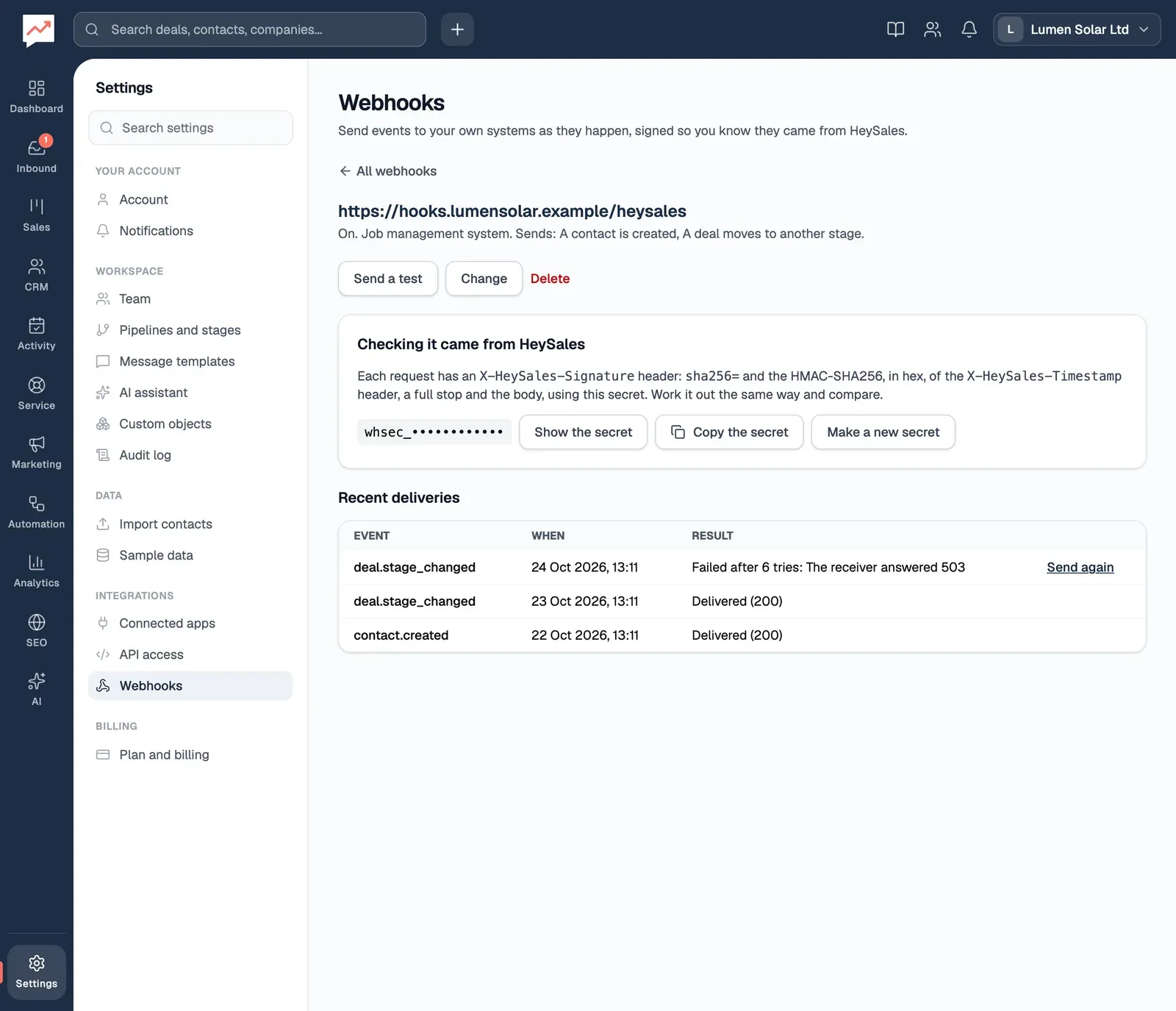
Section titled “A webhook’s page”Choose a webhook’s address in the list to open it.
-
Send a test sends a “ping” event straight away and tells you how your system answered, such as “It worked: the receiver answered 200.” A failed test isn’t tried again.
-
Change edits the address, description, events, or turns the webhook off.
-
Show the secret and Copy the secret show and copy the signing secret. Make a new secret replaces it. The old one stops working straight away, so update your system at the same time.
-
Recent deliveries lists the last 50 events sent, with how your system answered. Send again sends a failed one now.
When a delivery fails
Section titled “When a delivery fails”A delivery has failed if your system doesn’t answer within 10 seconds, or answers with anything other than a 2xx status, including a redirect. HeySales tries again after 1 minute, 5 minutes, 30 minutes, 2 hours and 12 hours, so each event gets 6 tries over about 15 hours. While it’s waiting, Recent deliveries says when the next try is.
If 10 events in a row fail every try, HeySales turns the webhook off and its page says so. Fix your system, then choose Change, tick On and save. Turning it back on starts the count again.
What’s sent
Section titled “What’s sent”Each event is a POST with a JSON body like this:
{ "id": "evt_9c1d2e3f4a5b6c7d8e9f0a1b", "type": "deal.stage_changed", "occurredAt": "2026-10-25T09:41:12.000Z", "data": { "contact": { "id": "t8q2…", "firstName": "Tom", "lastName": "Reid", "email": "tom.reid@northgatedental.example", "phone": "07700 900102", "title": "Practice manager", "createdAt": "2026-09-01T10:00:00.000Z" }, "deal": { "id": "k3m9…", "name": "Northgate Dental, 8 kW roof", "amount": 9600, "pipelineId": "p1x7…", "pipelineName": "Commercial installs", "stageId": "s4v2…", "stageName": "Site survey", "createdAt": "2026-09-07T10:00:00.000Z" } }}type is one of contact.created, deal.created, deal.stage_changed, form.submitted, meeting.booked, ticket.created, or ping for a test. data has whichever of these the event involves:
contact: ID, first and last name, email, phone, job title and when it was addeddeal: ID, name, value, pipeline and stage (IDs and names) and when it was addedform: the form’s ID and name, forform.submittedticket: ID, number, subject, status and priority, forticket.createdbookingPageId: the booking link, formeeting.booked
A test has "data": { "message": "A test from HeySales" }.
The headers are:
X-HeySales-Event: the event’s typeX-HeySales-Delivery: the delivery’s IDX-HeySales-Timestamp: when it was sent, in seconds since 1970X-HeySales-Signature:sha256=and the signature
Check it came from HeySales
Section titled “Check it came from HeySales”The signature is an HMAC-SHA256, in hex, of the timestamp header, a full stop and the raw body, using the webhook’s secret. Work it out the same way and compare. Also check the timestamp is recent, so an old request can’t be sent again.
In Node.js:
import { createHmac, timingSafeEqual } from 'node:crypto';
function fromHeySales(headers, rawBody, secret) {  const timestamp = headers['x-heysales-timestamp'];  const expected = 'sha256=' + createHmac('sha256', secret)    .update(`${timestamp}.${rawBody}`)    .digest('hex');  const given = headers['x-heysales-signature'] ?? '';  const fresh = Math.abs(Date.now() / 1000 - Number(timestamp)) < 300;  return fresh && given.length === expected.length &&    timingSafeEqual(Buffer.from(given), Buffer.from(expected));}
Use the body exactly as it arrived, before any JSON parsing.